Using Serial Devices in FreeBSD / How to set a terminal baud rate

Posted by Benjamin Close on January 8, 2010 under FreeBSD, UniSA | Be the First to Comment

Recently I was working on a php command line program that required access to a serial port.

Initially developed under Linux the program was then shifted to it’s permanent location on a FreeBSD server. This is where we first started having problems. Initially we discovered the server didn’t have a native serial port. We fixed this using a USB to serial converter/dongle (FTDI Chipset). This was fine as FreeBSD has the ufdti kernel module. Upon loading the module new devices appears in /dev

crw-rw----  1 uucp  dialer    0, 157 Oct  6 08:39 /dev/cuaU0
crw-rw----  1 uucp  dialer    0, 158 Oct  6 08:39 /dev/cuaU0.init
crw-rw----  1 uucp  dialer    0, 159 Oct  6 08:39 /dev/cuaU0.lock
crw-rw-rw-  1 root  wheel     0, 154 Jan  8 10:50 /dev/ttyU0
crw-------  1 root  wheel     0, 155 Oct  6 08:39 /dev/ttyU0.init
crw-------  1 root  wheel     0, 156 Oct  6 08:39 /dev/ttyU0.lock

We attempted to connect to our device using screen (screen /dev/ttyU0 115200) and everything worked as expected. We could send AT commands to the device all ok.
We then stopped screen and ran our php program. It ended up hanging on a fgets call to the serial port. This is really strange we though.
Next we queried the port to find out what baud rate it was set at:

>stty -f /dev/ttyu0
speed 9600 baud;
lflags: echoe echoke echoctl
oflags: tab0
cflags: cs8 -parenb

Strange we thought as we’d just connected with screen at 115200. Under linux we use screen to set the baud rate, all other programs accessing the port use the port at 115200. So what had set it back to 9600 baud?
We tried to use stty to set the speed:

>stty -f /dev/ttyU0 speed 115200
>stty -f /dev/ttyu0
speed 9600 baud;
lflags: echoe echoke echoctl
oflags: tab0
cflags: cs8 -parenb

What on earth was happening? We set the speed to 115200 but directly quering the port again indicated it was still at 9600 baud? At this point we were perplexed.
Eventually we found the solution. The newer FreeBSD terminal drivers provide the *.init devices, in this case /dev/ttyU0.init . These devices indicate the terminal settings to be applied to the terminal when the device is closed. Whilst Linux leaves the device in the same state the last program put the port into, FreeBSD restores the terminals state to what ever is specified in the init file. So a quick command:

> stty -f /dev/ttyU0.init -icanon -isig -echo echoe echok echoke echoctl -icrnl -ixany -imaxbel ignpar -opost -onlcr -oxtabs cs8 -parenb -hupcl clocal

And then to check:

> stty -f /dev/ttyU0
speed 115200 baud;
lflags: -icanon -isig -echo echoe echok echoke echoctl
iflags: -icrnl -ixany -imaxbel ignpar
oflags: -opost -onlcr -oxtabs
cflags: cs8 -parenb -hupcl clocal

Excellent. The terminal was now configured exactly how we wanted. We ran the program and it worked like a charm!

Caldav calendar & icalserver

Posted by Benjamin Close on June 24, 2009 under Computers, FreeBSD, OpenSource | Be the First to Comment
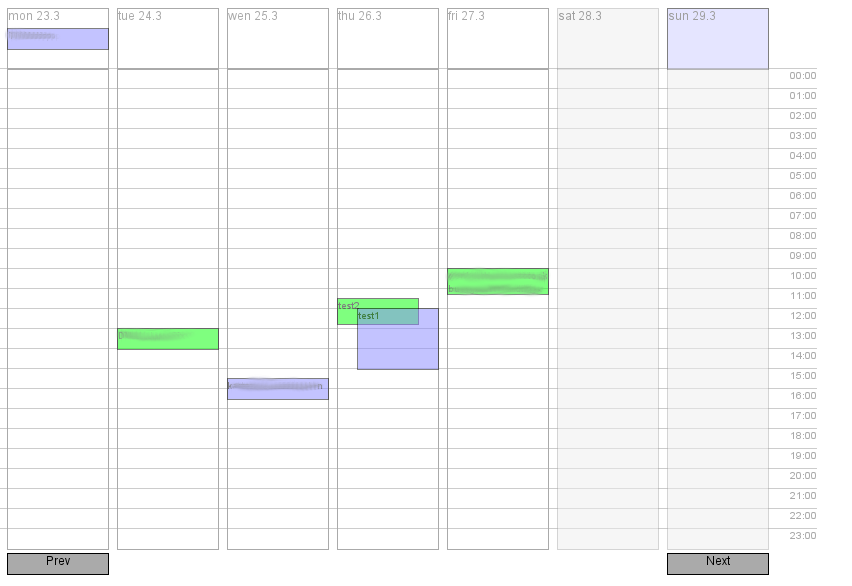
For quite a while now I’ve been using Apple’s ICal server on FreeBSD and Sunbird/Lightning as a front end to the calendar. However, one thing that has always annoyed me was the lack of a web frontend to my calendars.

Well today after searching on a completely different topic I found a javascript front end to caldav. After only a few minutes setup I had the frontend up and running. Sadly however, It didn’t play happy with ICalServer. A little debugging of the caldav REPORT request and I had it querying correctly.

Now there was valid data populating the table… or was it. Looking a little closer there were bugs with the reoccurring events and also with the lastMonday function. A quick fix (after 20mins finding them) and now the calendar works great!

Best thing about it is I can now have a public caldav calendar which everyone can view whilst being able to update thing directly on my own writable version of the caldav calendar.

Booting FreeBSD from a root zfs pool using a standard MBR and partition table

Posted by Benjamin Close on May 8, 2009 under FreeBSD | 3 Comments to Read

This page documents the current state of play for booting the root filesystem (/) off a zfs zpool under FreeBSD, using a standard master boot record (MBR) and a standard partition table. The aim was to be able to have a dual boot system for my laptop using the standard FreeBSD quick selection boot loader.

Note, this does not cover using the gpt based partition tables. If you want to use these, please refer to the following page: http://lulf.geeknest.org/blog/freebsd/Setting_up_a_zfs-only_system/ or booting zfs as root using a small ufs boot partition as provided by the instructions at: http://wiki.freebsd.org/ZFSOnRoot.

Below is the steps required to be able to setup the root zpool

  1. Download a FreeBSD -current fixit cdrom snapshot later than 200901, as these have loader ZFS support
  2. Burn the CD
  3. Boot the CD
  4. Setup any partitions you want – note you must setup the ‘a’ partition to cover the entire device as the loader will use this.
  5. Select Fixit from the menu, and use the CDrom as a source
  6. Create the pool and install the loader (see below)
  7. Copy the required files to boot (see below)

Creating the root zpool and installing the Loader

The fixit cd has everything required to create a zpool, however by default none of the required modules are loaded. Hence they need to be loaded first:

cd /mnt2/boot/kernel
kldload ./opensolaris.ko

kldload ./zfs.ko

Once the modules have been loaded all the zfs tools (zpool,zfs,zdb) should now work. Let assume you want to install FreeBSD to /dev/ad4s2 (second partition on a sata disk). You can do this using:

    zpool create somename /dev/ad4s2

Where somename is the name of the pool you want to create. This creates a single zfs filesystem and a zfs pool of storage. To install the boot loader you need to do:

    # dd if=/mnt2/boot/zfsboot of=/dev/da0s1 count=1
    # dd if=/mnt2/boot/zfsboot of=/dev/da0s1 skip=1 seek=1024

The first line installs boot1, the second line installs boot2.  However, boot2 is responsible for loading boot3 (aka the loader – found in /boot/loader). Hence that must be put in place.

Copying the required files to boot

The easiest way to get things to the point where things are ready to boot is to copy all the files from /dist  - the live distribution. Before you do this, you might like to take advantage of zfs and create some subfilesystems so you can snapshot, monitor space, etc.

For instance creating a /usr and /var filesystem is often very handy:

    #zfs create somename/usr
    #zfs create somename/var

Now you can copy the base system:

    cp -a /dist/* /somename

This will install among other things:

  • /somename/boot/kernel/kernel  - FreeBSD kernel
  • /somename/boot/kernel/opensolaris.ko – zfs dependency
  • /somename/boot/kernel/zfs.ko – module understanding zpools/zfs
  • /somename/boot/loader  - the FreeBSD loader

At this point you need to replace the loader with one that understands zfs. You can download the loader from: (To be advise – see cavet below)
And if you have a usb stick copy it in place using:

   mount_msdos /dev/da0s1 /mnt
   cp /mnt/loader /somename/boot

Finally you have to tell FreeBSD where to mount filesystems on a standard boot:

   zfs set mountpoint=/var somename/var
   zfs set mountpoint=/usr somename/usr

At this point any command you type will now probably fail indicating it’s missing some shared library. This is because /usr has now changed. You can get around this by telling the loader where to find valid libraries:

   export LD_LIBRARY_PATH=/mnt2/lib

Next we need to build the zfs cache. This is used by zfs mount to automatically mount zfs filesystems by /etc/rc.d/zfs at boot time. It’s also used to determine if a filesystem is local to the system or belongs to an exported pool.

   mkdir /boot/zfs
   mkdir /somename/boot/zfs
   cd /
   zfs export somename
   zfs import -f somename
   cp /boot/zfs/zfs.cache /somename/boot/zfs/

Finally we tell the loader where we want to boot from and set the init scripts to automatically start all zfs filesystems:

    echo 'zfs_enable="YES"' > /somename/etc/rc.conf
    echo 'zfs_load="YES"' > /somename/boot/loader.conf
    echo 'vfs.root.mountfrom="zfs:somename"' >> /somename/boot/loader.conf

And set the root filesystem to a legacy mountpoint (so zfs mount -a won’t try and mount an already mounted filesystem)

     zfs set mountpoint=legacy somename

At this point you can reboot and things should now boot!
Update: 20090809

There has been a lot of updates to instructions along the way. There are now official ZFS on Root instructions available using GPT/MBR/other available at: http://wiki.freebsd.org/RootOnZFS

mythtv on FreeBSD: Setting Up Ports

Posted by Benjamin Close on April 1, 2009 under Mythtv | Be the First to Comment

Step one of getting Mythtv working under FreeBSD involves setting up the required ports.

In my toils of setting up Mythtv I’ve decided to use the development version of MythTV as at the time of writing it hasa lot more features and whilst there is a port of Mythtv 0.18 available, it lacks a lot of the things that will be needed to get MythTV running nicely on FreeBSD.

The first stage in trying to get things running is to install the required ports needed to build the svn version (as of 20090401). I found the following ports were required:

Mythtv has a lot of required dependancies:

  • devel/qt4-corelib  (builds most of qt)
  • x11-servers/xorg-server (build xorg and all required client libs)
  • x11-drivers/xf86-input-keyboard
  • x11-drivers/xf86-input-mouse
  • devel/subversion
  • print/freetype2
  • audio/lame
  • databases/qt4-mysql
  • comms/lirc
  • x11/libXvMC
  • graphics/libGL
  • graphics/libGLU
  • x11/qt4-opengl
  • devel/qt4-qt3support
  • x11-fonts/xorg-fonts-75dpi
  • x11-font/font-misc-misc
  • x11-font/font-alias

With the ports installed, we can now try and get Mythtv building.

mythtv on FreeBSD: The beginning

Posted by Benjamin Close on under Mythtv | Be the First to Comment

This article is the first in a series of blog entries which documents my progress getting FreeBSD 7.1-Stable working a both a MythTV backend and frontend. There’s very little information out there talking about this process, probably as FreeBSD’s multimedia drivers are not as mature or as abundant as Linux’s . However there is some information out there alluding to clues that is it possible.  Below is the specs of the computer I’m using for this setup.

Hardware

  • CPU: Core2Duo  E8200  @ 2.66GHz
  • HDD:
    ad0: 114472MB <WDC WD1200JB-00FUA0 15.05R15> at ata0-master UDMA33
    ad4: 305245MB <WDC WD3200AAKS-00B3A0 01.03A01> at ata2-master SATA150
    ad6: 190782MB <Seagate ST3200822AS 3.01> at ata3-master SATA150
    ad7: 190782MB <Seagate ST3200822AS 3.01> at ata3-slave SATA150
  • Video Card:
    NVideo GeForce 7300 LE
  • Audio:
    Intel 82801G (ICH7 Family) High Definition Audio
  • Capture Cards:
    • CX2388x TV Capture Chip (DVB-T)
    • Conexant (Was: Brooktree Corp)
      ‘7610144D&REV_02\4&1F7DBC9F&0&09F0 TV Video Capture

With the hardware set and not likely to change (I refuse to buy hardware due to an O/S not working with what I’ve got), it was time to try and get things working. Whilst there is a mythtv port, it’s the old stable release of 0.18. There has been a lot of changes since then. Including the new libmythui library where groovy graphics features are available. I must admit I’m not coming in to this blind. I’ve been running mythtv under Linux for quite some time.  Hence I’m quite aware what needs to be done under Linux to get a working Mythtv setup. Hence I’ll break this article up into a number of different steps as below. Each one being a different blog entry.. some of these steps are going to take a while to get working!

  1. Setting up required ports
  2. Setting up capture cards
  3. Setting up audio
  4. Setting up Xorg
  5. Installing Mythtv
  6. Configuring Mythtv
  7. Tweaking Mythtv

For anyone who wishes to follow this drama of getting things working below I provide some links I’ve found which useful in determining what might be possible. I also provide a little justification as to why I want Mythtv working under FreeBSD.

Why the Switch?

After having mythtv successfully running under various versions of ubuntu, I finally reached a point where Linux annoyed me enough to try and get rid of it in favour of FreeBSD. It’s not that Linux didn’t work, it’s just the amount of stuffing around I had to do to get things working was CRAZY! Sure installing mythtv was relatively easy but it’s all the little things that FreeBSD does so well that Linux doesn’t that made me want to change. Thinks like power management, cpu throttling, wireless that actually works!

These things are just easier under FreeBSD, there’s no config, overiding some config, linked to some default, using some crazy symlink farm. There’s not ‘volatile’ kernel modules which must go through crazy loading scripts because they are not GPL compliant. FreeBSD also is much easier to upgrade in place and has the ZFS filesystem. This is the main reason I wanted to switch. I use the same machine as a backup server with 2 disks in raid 1. The ability to daily snapshot at the filesystem level is just soooo nice!

FreeBSD Mythtv Links

Below are some links that I found useful when getting mythtv working under FreeBSD.

  • http://mythtv.son.org/tiki-index.php
  • http://wiki.freebsd.org/MythTV
  • http://www.lemis.com/grog/HOWTO/mythtv-on-FreeBSD-setup.html

Solving the qt4 FreeBSD install problem

Posted by Benjamin Close on March 4, 2009 under FreeBSD | Be the First to Comment

Recently I’ve been trying to instal Trolltech’s Qt 4 toolkit on my FreeBSD 7.0 server.  FreeBSD supports qt4 via ports (qt4-gui, qt4-moc, qmake4, etc), hence I’ve been using the ports system to try and install it. However it kept failing with the error:

===>  Configuring for qt4-rcc-4.4.3
/bin/cp /data/usr/ports/devel/qt4-rcc/../../devel/qt4/files/configure /data/usr/ports/devel/qt4-rcc/work/qt-x11-opensource-src-4.4.3/src/tools/rcc/../../../
/usr/bin/sed -i.bak -e 's|target.path.*|target.path=/usr/local/bin|g'  /data/usr/ports/devel/qt4-rcc/work/qt-x11-opensource-src-4.4.3/src/tools/rcc/rcc.pro
/bin/mkdir -p /data/usr/ports/devel/qt4-rcc/work/qt-x11-opensource-src-4.4.3/src/tools/rcc/../../../mkspecs
/bin/ln -sf /usr/local/bin/qmake-qt4 /data/usr/ports/devel/qt4-rcc/work/qt-x11-opensource-src-4.4.3/src/tools/rcc/../../../bin/qmake

This is the Qt/X11 Open Source Edition.

   The specified system/compiler is not supported:

      /data/usr/ports/devel/qt4-rcc/work/qt-x11-opensource-src-4.4.3/mkspecs/freebsd-g++

   Please see the README file for a complete list.

===>  Script "configure" failed unexpectedly.
Please report the problem to kde@FreeBSD.org [maintainer] and attach the
"/data/usr/ports/devel/qt4-rcc/work/qt-x11-opensource-src-4.4.3/src/tools/rcc/../../..//config.log"
including the output of the failure of your make command. Also, it might be
a good idea to provide an overview of all packages installed on your system
(e.g. an `ls /var/db/pkg`).
*** Error code 1

After some brief Google searching, I found the issue. It turns out that a long time ago I had been using qt4 with another project I had been working on. With this project I’d defined:

setenv QMAKESPEC freebsd-g++
setenv QTDIR /usr/X11R6/

This was causing the build system to break. The post at:  http://mail.kde.org/pipermail/kde-freebsd/2008-August/003360.html gave the hint about this.

Once I undefined QMAKESPEC everything worked as expected!

FreeBSD VPN

Posted by Benjamin Close on November 13, 2008 under Computers, FreeBSD | Be the First to Comment

FreeBSD VPN

This document describes how to setup both the server side and client side for a PPTP connection with MPPE encryption that works for windows, MacOsX and other freebsd boxes.

The basic process:

 - Install & configure pptpserver on the freebsd server
 - Configure ppp on the freebsd server
 - Setup the clients
1. Installing pptpserver

This part is handled really easily as it pptp server exists in the ports collections. Hence all you need to do is:

 cd /usr/port/net/poptop
 make install

To configure pptp modify /usr/local/etc/pptp.conf\\ Put the following lines in the file:

 localip 192.168.2.1
 remoteip 192.168.2.56-75

 # Listen on the outside interface only
 listen 130.220.37.202
Configure ppp on the freebsd server

Edit /etc/ppp/ppp.conf and set the following target only:

  pptp:
    set ifaddr 192.168.1.1 192.168.1.56-192.168.1.74 255.255.255.255
   set dns 192.168.0.1
    set nbns 192.168.0.1
   disable pap
   disable utmp
   disable passwdauth
   #enable chap     # MPPE Requirest chap81/MSChapV2
   enable MSChapV2
   enable mppe      # Enable Encrptions
   set log Phase Chat LCP IPCP CCP tun command  # Debugging
   set timeout 0   # Don't drop the connection
   #
   # Force 128 bit encryption with a key change every packet
   # MacOSX only works with stateless connections and the are more
   # secure anyway - just less efficient.
   set mppe 128 stateless
   # Disable compression - freebsd clients try to use it but it breaks mppe
   disable deflate pred1
   deny deflate pred1
   set server /var/run/pptp_ppp_%d "" 0700
   accept dns              # Enable clients to request dns details
   disable ipv6cp          # Disable ipv6
   enable proxy            # Enable proxying addresses on the local net for clients

Now modify/create /etc/ppp/ppp.secret and put in it:

 someuser  userpassword  192.168.1.75

Now ’someuser’ can log in with the password ‘userpassword’ and will get an IP address of 192.168.1.75. If you don’t want to specify the ip, just leave the 3rd parameter off that line of the file.

Setup Clients

This section details how to setup various clients

Windows XP

 - Create a new VPN connection
 - Specify host
 - Specify Usename  / password
 - Hit connect

FreeBSD

Freebsd works with MPPE out the box. Simply setup the following in /etc/ppp.conf

 MYVPN:
   set authname someuser
   set authkey  userpassword
   disable pred1
   enable proxy
   disable ipv6cp
   set timeout 0
   add default HISADDR

Install pptpclient

   cd /usr/ports/net/pptpclient
   make install

Now run it with: pptp serverip MYVPN\\ ie:

  pptp  130.220.37.2 MYVPN

Mac OsX

Simply configure the GUI tool.

Setting up Sendmail with TLS & Auth support under FreeBSD

Posted by Benjamin Close on under FreeBSD, OpenSource | 4 Comments to Read

In order to setup a secure mail transport agent (MTA) that helps eliminate some spam and also allows roaming client support, some sort of authentication mechanisim must be added when setting up a MTA. In my case I’m using FreeBSD 4.9 with sendmail as my MTA. Setting Up Sendmail

Read more of this article »

iwn

Posted by Benjamin Close on November 8, 2008 under FreeBSD, wireless | 6 Comments to Read

Last Updated: 20080521054508

This page documents the current state of the IWN driver for FreeBSD, the driver supports the Intel 4965AGN Wireless Card, often found in Intel Centrino based laptops. If your looking for the driver for the 3945 chipset check out the wpi page.

Note: A majorly updated version of the iwn driver has been committed to FreeBSD -Current (aka 8.0). This version is greatly advanced over the perforce version. If you intend to try the perforce version under 7.0 please make sure you are running 7.0-STABLE not 7.0-RELEASE

An up to date commentary on what I’m working on can often be found in my blog and this is a wiki page so you can check the page history for what has changed

Details on how to help debug the driver are in README file that’s in the download package.

For those of you wanting to try the perforce version of the driver, the script P4fetch.rb will help you easily obtain the files. The script was provided by Tom Evans.

History

  • Iwn Committed to FreeBSD -Current (aka 8.0)
  • Perforce Version (Not yet tarballed – available here)
    • Initial OpenBSD Import
    • Many locking additions
    • Lots of changes to get things working. At present, the card will talk with an unencrypted access point, pass packets but stops passing packets after a while.
    • Major overhaul by Sam Leffler
  • Perforce (VAP Branch)
    • Major changes to support vap

Installation/Testing Instructions

At present installation of the driver is very much hands on.

To install the driver:

  • Download from p4 using the scribe above
  • Read the README file

FAQ / Build Issues

  • No common FAQ’s as yet.

Outstanding issues

  • Background scanning doesn’t yet exist.

Frox & PF

Posted by Benjamin Close on November 7, 2008 under Computers, FreeBSD | Be the First to Comment

This article describes how to setup Frox to perform transparent proxying and caching via pf under FreeBSD.

Read more of this article »