
Solution: Belkin F5U409 USB to Serial Converter in 64bit Windows 7/Vista/Mac OSX 10
Posted by Benjamin Close on December 10, 2010 under Computers |  225 Comments to Read
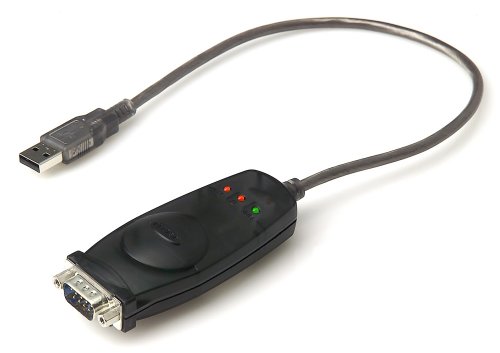
(Note: Mac Users may want to skip to the bottom)
After a number of years my old Windows Vista 32 bit installation was a little worse for ware. Having a laptop capible of 64 bit I decided to upgrade to Window 7 64 bit. After a fresh install of Windows 7, I began the process of installing drivers for the hardware I had. It wasn’t until I came to my trusty Belkin USB to Serial (RS232) converter, aka PDA adapter that I encountered a problem.
After visiting Belkin‘s website and looking up the driver page for the convertor, I discovered that Belkin didn’t support both Vista 64bit and Windows 7 64 bit. Here’s the details from their knowledge base page (can’t link it due to thier website design):
“Is the F5U409 USB PDA Adapter compatible with vista 64 bit?
No, this product is not compatible with vista 64 bit. It is compatible with Vista 32 bit computers. We do however have a similar adapter which is compatible with Vista 64 bit, you can use part F5U257 (USB-to-Serial Adapter).”
What a rip off? Not only doesn’t Belkin support their old hardware they try and get me to buy their new hardware!
Being a computer system administrator and programmer by trade, I knew there would be no physical reason the device would not work under a 64 bit operating system. It was down to Belkin not wanting to spend the time or money to update the driver. In most cases, it would simply be a recompilation of the existing driver.
Hence I began searching to see if anyone had got the device working. There was lots of webpages/forum posts about how people failed. Lots of posts indicating it’s not supported, even an official microsoft page indicating it’s not supported under Microsoft Windows 7. Then there were a few posts indicating to try various different drivers, most seem to relate to either the Prolific or FTDI chip/chipset which apparently exists on other models of the Belkin adaptors (F5U109?) and with other USB/RS232 converters and hence works with some other drivers. But sadly nothing about the Belkin F5U409 adaptor.
Hence I figured enough is enough. I had previously found a website where someone had pulled the adaptor apart to determine if the chipset was an FTDI chipset. Sadly it wasn’t it was instead a Philips P87C52X2BA microcontroller seemed to be used. Hence I did a lot of searching for that particular chip in google, all with no luck. Eventually I thought hmm, lets just see if we can find another USB232 converter that used a Philips chip.
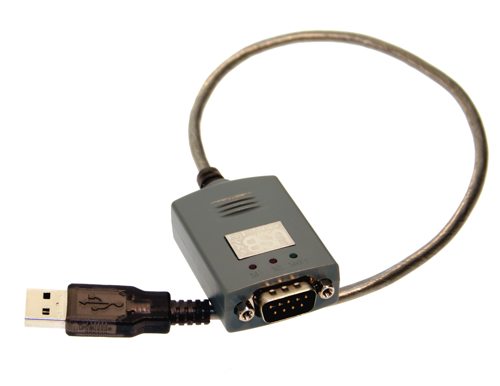
Magic Control Technologies U232-P9 Adaptor
It was then that I found the MCT U232-P9 DB-9 Serial Adapter High Speed 230K USB SERIAL RS-232. This device used the “P87C52 – 80C51 8-bit microcontroller and PDIUSBD12 made by NXP Semiconductors founded by Philips.” It was perfect the chip matched. I hence spent quite a while working out who MCT were. It turns out that MCT stands for Magic Control Technologies. On the MCT website, on their driver page they had drivers for their USB/Serial convertor and they support Visa, Windows 7, 32bit & 64bit. So I downloaded the driver U232-P9 Driver.(Click Here for a Local Mirror incase MCT remove it)
I then crossed my fingers and installed it. After a quick reboot I plugged in my Belking F5U409 adaptor and it was detected! A quick check. It worked!
So to Belkin who wanted to force me to buy yet another product – support your products!
As a bit of an ironic twist, I later began cleaning up the original installed Belkin driver (I had tried the Vista 32bit version with no success). It was then that I discovered that Belkin don’t even write their own drivers but use Magic Control Technologies drivers! (You can find this by right clicking on the u2sxp.sys file that Belkin installs to C:\Program Files(x86)\Belkin\F5U409\Driver\u2sxp.sys and clicking the details tab). So not only are they not updating the drivers, they didn’t write them in the first place!
Finally, if your a Mac OSX 10 user you might also want to check the Magic Control Technologies driver page as drivers exist for you as well – shame on you Belkin.
Greg said,
I’ve been searching for a solution to this since buying my Windows 7 laptop a year ago and stumbled across your solution. It works for the two F5U109 adapters I have as well. Now I can use the GPS and motorcycle tuner I have that need a serial port. Thank you!
MBorge said,
You are an Uber Tech my friend! This does indeed fix my F5U109 thus extending the life of my old Wacom Intuos tablet. Thank you!
Drall said,
I recently got a new laptop and it has no serial port.
I had a staples USB to Serial, which worked with XP.
This driver works great thank you very much.
James said,
Belkin F5U409 USB TO RS-232 USB PDA Adapter compatible with Windows 7 64bit?
Now it is….
So I downloaded the driver U232-P9 Driver it Works! Now i can hook-up my Celestron Advanced GT telescope to My Starry night PRO PLUS 6.23 Software on my iMac intel-based Running Winows 7 on BootCamp
Mark said,
I’m in Australia and have a tag reader that I use to keep track of my cattle. Have been using F5U409 USB to Serial adapter. Stopped working when I bought my new Windows 7 laptop. Spent quite a few hours searching on the net for a solution before I found your article. Thanks to you and your willingness to share your solution it’s working again!
Mike said,
Thank you so much for figuring this out. I too had tried the Prolific drivers a few months ago, but of course they didn’t work.
Now I can connect to my router and firewall’s console port with my Windows 7 laptop instead of having to use an old laptop running XP.
You have been a *GREAT* help.
AC said,
Thanks! Worked great in Windows 7 64-bit.
Matt said,
That is the best help I have had on this. Thanks for your in-depth research. I have tried other driver options people have suggested…but this one is the only solution to the F5U409 adapter.
I volunteer my time and resources by providing a weather station that uploads it’s information to the multiple resources on the web. When I upgraded, I assumed there would be a driver readily available as the adapter is of fairly new builds if that is ok to assume. I thought, why surely there is a driver for this, compared to a Prolific adapter I have. Even the prolific had drivers for Windows 7 64-bit but the weather station doesn’t communicate with the computer with that adapter, even with the newer drivers. It was used for a radio interface adapter.
The only adapter I saw that would work with my station is this Belkin F5U409 adapter and this driver you have found works! Thank you so much. I already put a lot of my money into the station, the adapter, the software, etc. It’s things like this that Belkin wouldn’t understand and why I was searching for a whole reason not to get their latest adapter. But as I have found, they run a model like cell phones, just produce a newer model and let the old lay to rest.
Well, all is well now! This should be on Google’s ranks higher. The only way I found this was through another forum that linked to this. Thanks Benjamin!
Matt – KD7BJG
Aten said,
Thanks for sharing this. I confirm it works flawessly in Windows 7 64 bit.
Thanks
Errol said,
Great post, I have searched and searched for a fix, I was about to buy a new adapter until I saw this post. Worked like a champ.
Anything I am missing - Page 4 - FTABeta.com - Always Improving said,
[…] gopalmm2 Which driver did you install? The one I provided? No I downloaded from this forum. How to use a Belkin F5U409/F5U409-CU USB To PDA Serial Converter in Visa/Windows 7 64bit & Mac O… it works for windows 7 […]
Tim said,
Legend! Worked perfectly for me with Win7x64.
Slides said,
Thank you for your efforts, I was a bit sad panda until I found this, wanted it for tuning with older ecus.
Jed said,
Thank you. Much appreciated .
Dan said,
It worked great! Thank you for sharing your knowledge.
Chris said,
Thank you so much for this solution you are a very good man. May good fortune follow you for the rest of your days. Works with my F5U109.
Benji said,
Thank you!
You saved me from going out to buy another USB/Serial product!
Help needed for CW-700 with Windows 7 - Page 2 - FTABeta.com - Always Improving said,
[…] Originally Posted by azs2000 My CW-700 was working fine in my old PC with Windows XP. However, it is not working in Windows 7 environment in my new PC. The executable file rr-sssp-client.exe is stopped working. When I run it I get the message "Failed to reconnect to card server." After a minute later error message pops up with "rq-sssp-client.exe has stopped working." I believe it is a compatible issue. Is there any Windows 7 compatible exe file? I believe my last resort would be to go with dongle. Is there any other solution to it beside going with dongle? Hi buddy, use this driver for windows 7. After long search I found this driver. I worked for me on Windows 7. How to use a Belkin F5U409/F5U409-CU USB To PDA Serial Converter in Visa/Windows 7 64bit & Mac O… […]
Pale said,
Excellent. After having several pieces of hardware and software not compatible with win7 it’s good to get an older bit of kit working again.
Manny said,
I don’t even know where to begin thanking you for this. My desktop died and I was forced to get a newer machine with Windows 7. My Belkin adapter is crucial to a lot of radio programming that I do. I did a LOT of research and came up empty. I thought I was done. Thank you for sharing your discovery with us.
Sam said,
Couldn’t thank you more my web friend
I cancelled buying new ones for my A-team of 15 !!
Curt Lane said,
A++
hours and hours of searching and I finally found your detailed solution for the Belkin F5U409 working on Windows 7. Thanks so much!
Roscoe said,
Much appreciated. This Belkin adapter has frustrated me many times, but this is a nice quick solution!
Kevin A. Baroni said,
Benjamin, thank you for saving me additioanl frustration and wasting any more time/money on this issue. Your research and the MCT solution worked beautifully. Please accept my donation as Belkin does not deserve it 🙂
Sam Ali said,
Thank you very much. I was bummed when Belkin pulled the “not supported with win 7” tactics. I am indebted to you for your time and expertise.
Sonnox said,
We have a device that will only work with serial ports and we have been advising customers to get adaptors like the belkin USBtoserial to get around the problem of not having COM ports on new PCs and also because Belkin advertised the adaptor have lifetime warranty this gives the customers some comfort in using them. The problem of having the drivers for windows 7 had us stumbled as we are unable to find any alternate solution.
Thanks spending the time finding the drivers.
Belkin, shame on you!!! so much for “lifetime warranty”
Matt said,
I just thought I’d come back and check on this page after my success. It seems many more are getting the same, positive results. Glad everyone else is getting the rather decent, not so antiquated adapter working also!
Cheers!
Marc said,
That’s awesome; worked like a charm…
Brett said,
Thank you for saving the life of a number of items I have not been able to connect to since upgrading to Windows 7 64 bit.
You sir, are a godsend!
Felix said,
Hi Man
Thanks a lot!!!, I just got the driver you mentioned here and it worked wonderful.
david said,
Greta tip. In our office we have the Belkin as well as a Targus PA088U converter. Both devices suffer from the 64 bit driver issue.
Out of desparation I just installed the driver and to my relief it works like a charm with the Targus PA088U.
I have contacted Targus support over this & look at the crud they responded with. “There are no driver for a 64 bit operating system as there is no way to change the hardware inside the the PA088U, nor will there ever be”
I smell bullshi1t…
chopper said,
Hey ,
just bought this blekin 409 and i got w7, so i was like damn $40 down the drain, but then saw you post!!!!!!!!!!!!!
I praise you for your stuburnish ways and thankyou a thousand fold, take care
Rolf said,
Hi, your full of useful information, thank you for sharing some of your knowledge with us!
Aaron said,
Thank you! In need of console access to an ASA asap and this saved my ass.
Phil InOz said,
What a champion!!. Have been bumming around all day with prolific & Belkin drivers and in typical fashion stumbled across this AFTER the working day has elapsed.
Mitch said,
Just thanks !
F**K Belkin !
Arjen in Perth said,
great hero
thank you so much.
now we can use our GPS for a couple of extra years
LJM said,
I’ve been working on this problem all day trying various drivers to get the belkin f5u109 to work with Windows 7. This download did the trick! Thank you so much! 🙂
Rick said,
Thank You for publishing a solution for the Belkin adapter!
I have several of these F5U109/F5U409 and was not looking forward to a replacement adapter.
Les said,
Fantastic. Just what I needed to configure Bluesocket wifi access points with Win7 laptop. Excellent work.
Mikhail said,
I love searching the net for answers and solutions…
I thought i spent that money for nothing. (kinda did)
Works perfect.
Belkin, You need to stop ripping people off and contribute to the community. Most of the people that spend money on your products don’t mind spending, as long as we get what we pay for.
ZappedC64 said,
Thank yo for this post! You saved me from having to buy a new serial to USB converter.
Now… time to transfer some disks to the Apple //gs with ADTpro.
Dell said,
Thank you so much for sharing your hard work and research! I was about to buy another adapter when luckily I came across your solution. It solved my problem! You’re the greatest!
PJCVSI said,
Awesome – worked like a charm. Too bad Belkin isn’t supporting their products with updated drivers.
bRAD said,
Thanks so much. You’ve been a great help to a lot of people.
Bill in Boston said,
You’s a GENIUS!!!!!
Problem with Zeitronix logging - Pelican Parts Technical BBS said,
[…] had some luck with mac drivers on my Ubuntu I don't know if this is your issue but Solution: Belkin F5U409 USB to Serial Converter in 64bit Windows 7/Vista/Mac OSX 10 – ClearChain driver link at bottom of […]
CK said,
THANKS!!!!!
Brad said,
Belkin F5UR409 worked PERFECTLY on Windows 7 “starter” on my Acer Aspire One netbook, but only upon installing this driver. Thanks!
Doug said,
After about six months of frustration with windows 7 and my older garmin gps and software (that worked perfectly with XP), I am back in business. Thank you for the work around, it worked perfectly. Yes, Thank You!
Jones said,
I got this adapter:
http://www.usconverters.com/index.php?main_page=product_info&cPath=67&products_id=244
and it works flawless with Windows 7 32/63 bit
Jan said,
Ben all I can say is ‘thank you, thank you, thank you. My husband had a Belkin PDA Adapter and had also updated to 64 bit laptop. This adapter is used for outboard motor analysis and after installing the driver you added it now works. He was getting very frustrated and thought he had to buy a new cable.
Akhil said,
Thanks Ben – Thank you very much!!!!!!
Mr. Jones said,
Ben,
You ROCK !
Thanks for taking the time to post your findings. Worked the first time. You saved my sanity, not to mention a few bucks.
Mr. Jones
GG145 said,
Thank you for this easy solution! Now my port works again!!
–GG
Brett said,
Thanks, just what I needed while setting up a new Win7 x64 install.
Abdul said,
Ben,
You ROCK !
Thanks for taking the time to post your findings.
Thanks a Lot.
Pat said,
Ben,
Thanks, worked great
Dex said,
Hey, thanks this worked exactly as you described for my Belkin FSU409 that I’m connecting to CISCO network devices to a console cable.
I went the useless Belkin support, and created two accounts, but could not login. I called the 800 number and was sent to India for support. They basically said it was not supported and I should return the product. They also said that I could not login because the online support was on a holiday and that’s why I could not login. I suggested that they put that on their website.
Very Frustrating looking for a driver that they should provide. I will not buy Belkin again.
Thanks Ben for working out the issue.
fiona said,
Brilliant
Belkin really should pay you for this.
Michael said,
This worked for us too – thanks!
Gabe said,
Looks like I’m the lone dissenter – this didn’t work for me 🙁
Jainesh said,
Thank You!! Thank You!! Thank You!!
You sir are a gentleman and a scholar! Thanks very much for finding this solution!
Have a great day!
Bob said,
Good job! Worked first try on my i3 winders 7 64 bit. Now I can get my Digipan up on HF! Thanks.
David said,
Thank You
Needed adapter for Summasketch digitizer with DB9 port. Driver worked on Vista 32 laptop but not on my desktop with Win 7. Tried your method and bang it works! Now I don’t have to buy a new $350 digitizer with USB. Can now make RC airplane parts files from plans to laser cut.
Ariel said,
Thank you very much – your post is invaluable!
Pasquale said,
Great! 5 stars!
Manny Espaillat said,
Thank you for the post, I utilize my Belkin USB to Serial adaptor daily and didnt want to buy another piece of hardware to get things done.
Best regards.
Rene Dobler said,
Thanks, you should get more money, saved me from a lot of grief.
From downunder.
Charles said,
Thanks very much for this info. Now I can program my B&K Remote Control again.
Matt said,
Thanks a bunch,
Kris said,
Life saver!!
Thanks
Darrell said,
Thanks much!
BeNJaM said,
You are awesome!
Cris Robinson said,
Hi i have an older top of the line Pfaff sewing machine Creative 2144/2170 and it connects to the computer trough a serial port, and I have used the Belkin cable on a XP laptop without a problem but this week the laptop died and i wasn’t sure if the machine program was going to work on my Windows 7 laptop, since Pfaff doesn’t support the 3D File Assistant, I found this post on Google and gave it a try, and it works perfectly, it is amazing how a company can sell you a item that costs thousands of dollar but don’t offer support for more than 3 to 5 years, because they want you to buy their latest programs that cost hundreds more, it would cost me almost $300 dollars to buy a new USB cable from Pfaff for my machine but this helped me so much thank you so much for this post !!!
Ray said,
I downloaded the driver as you suggested (from the MCT website), for my F5U109, and it now works fine with my new Windows 7 laptop. I have already successfully downloaded/uploaded my Honeywell GPS data today.
Thanks.
Lu Donato said,
Genius!!!thanks buddy!
Ariel said,
Thanks, Ben!!! A research job well done!
After a contracted company installed our weather station, they left us with the Belkin F5U109 USB-to-Serial adapter. With all of our units running 64-bit, this driver is truly a wonderful find.
Again, your effort is much appreciated.
Ariel
Claudia said,
thank you so much , i got all the data readings from a race car!!! thanks again
Claudia said,
thank you so much , i got all the data readings from a race car!!! thanks again
Emile said,
Nice job, worked for me on windows 7 64 bit Home.
Terry said,
Thank you, sir!
Marc said,
03/31/12 – YOU THE MAN! I hadn’t used my Etrex for several years so I’ve been fumbling around trying to get my old Garmin Etrex Vista to communicate with my Windows 7 OS, to no avail. Until I fumbled on your solution for the Belkin. I have the Belkin usb to serial f5u109. Your instructions worked beautifully. Just another reason to NOT support Belkin products. Thanks
Carlos said,
Thanks very much. I’m an FE that works on SUN and Cisco equipment and I depend greatly on having console session using my laptop. My XP Pro (32-Bit) crapped out on me and I’m borrowing a friends laptop – Windows7 64-Bit. First I had to deal with Windows7 not having hyperterm installed, once I figured how to add hyperterm I ran into the Belkin dongle not being supported until you saved me. Thanks again.
DG said,
Hi Ben
THANK YOU, THANK YOU, THANK YOU!!! My 60+ hubby is a refrigeration specialist who has just started working on chillers in the local hospital. He is not computer savvy and had become increasingly frustrated not being able to install the belkin driver on his new laptop. I’m more familiar with IT and used google to find your solution, downloaded the driver and installed it. When I showed hubby that the belkin device had been detected by his laptop – he was over the moon!!! Oldies like us are eternally grateful to IT guru’s like you who don’t give up until you find a solution, and THEN – you’re selfless enough to share it…you have a good soul…Thanks Again…
JL said,
Great. It works perfectly
Siegfreid said,
Ya! Es ist sehr gut mine freund! Danke sehr!
Glenn said,
Many thanks for the tip. Works great on W7 64 Bit.
adam said,
Thanks so much this worked like a charm for WIN7!!!
Larry said,
You are a Rockstar. Wow. Works perfect first time and I’m computer dumb. You are awesome Thank You.
Ben's guide to making your site show up in Google (SEO) said,
[…] Recent CommentsLarry on Solution: Belkin F5U409 USB to Serial Converter in 64bit Windows 7/Vista/Mac OSX 10adam on Solution: Belkin F5U409 USB to Serial Converter in 64bit Windows 7/Vista/Mac OSX 10Dewey […]
Dave said,
Thanks so much! It worked for me…
Nickyv said,
Worked for my Belkin F5U109’s as well.
Keep seeing this so often. A company (Belkin) licenses software and design from another company and then doesn’t pay for an upgrade from the licensor. This leaves us customers with useless dongles. Sadly, I’ve stopped purchasing Belkin after a few espisodes like this.
Adrian said,
Gracias por tu colaboración, me ha servido de gran utilidad….desde algún lugar de México.
Saludos
贝尔金(Belkin) USB转COM适配器F5U109 for Win7 64位驱动程序 | 摩登坊 | Steve Luo's Blog said,
[…] 于是Google了一下,中文资料是肯定不用想了,好在国外用的人还挺多,大多数看到的都是官方的驱动,哪怕是for Vista的也是不支持32位的。不过好在找到了一个使用非官方驱动程序的解决方法。 […]
Chris said,
Thanks for this, left a tip in the jar for you! keep up the good work.
Stéphane said,
Thank you Man!
Yves B said,
Same problem here. Your solution worked for me ! Shame on Belkin for not providing Win 7 drivers. Thanks for sharing all this.
Puntcat said,
Moltes gracies, thanks, perfect solution
r3n said,
Thank you sir! This worked for me as well.
Paul said,
Thank’s. It works.
I will never ever buy belkin product.
DTB said,
Updated location for these:
http://www.mct-us.com/downloadfiles/driver/U232-P9_v10.2.98.100806.zip
Vijay Iyer said,
Many thanks – I got this to work!
nosy said,
You are an angel, thanks!
Dave said,
Perfect, thank you, just what I needed for my monitoring project! 🙂
Dr. Clarke said,
You are awesome! Come work for me.
Yves said,
Already an owner of Belkin F5U109 since many years but needed to buy another adapter for the work. I bought the Staple model because there were no Belkin anymore.
The Staples USB to Serial software works well with Windows 7 x64. Besides, the Staple driver also works well with the Belkin F5U109. However, the Belkin hardware will be recognized as a Staple model.
Yves
Yves said,
Here is the link concerning the Staples driver for Windows 7 x64.
http://www.product-support-staples.com/Inst_837560.aspx
ENJOY!!!
Alex said,
Thank you very much. This is the only soluttion that worked.
Craig said,
Finally! A search and hit on the web that actually addressed and resolved the problem I had. Thank you very much for the solution.
Gman said,
Thank you for posting a local mirror! I appreciated it 🙂
David said,
Thanks a million. I bought an older gps unit that came with a belkin adapter. I was very frustrated at first when it didn’t work. It is great that people try to help each other with the information that they know.
Amy said,
THANK YOU!!!!
CB said,
Yay!
Christopher Tippins said,
A very big thanks to you, Sir! You saved the day! Great job figuring this out. I very much appreciate your efforts and for maintaining the link to your notes and the mirror as this adapter is getting kind of long in the tooth now! 🙂
Ed said,
I thought Belkin was a stand up company too. They need to quit selling the thing if it is not supportable on current systems. I just bought mine at Fry’s and didn’t even think about the need to check compatiblity (my bad). Thanks for the help! You save me a lot of hassle.
Yishai said,
Thanks a lot!!!!! 3 blue screens trying with the original driver and becoming frustated, but with you post and help this works perfectly!
Bernard said,
I just fiddled for an hour before deciding to get the old Compaq M700 with a serial port out!!
This was the second time I had to face this Belkin adapter problem.
THANKS a million 🙂
Haven’t bought a Belkin product since!
DJ D Complete said,
Thanks mate, worked a treat. Life saver!!
Sam said,
Hello!
And THANK YOU so much Benjamin and ClearChain 🙂
Now, I can use my Amplitrex with my Lenovo laptop.
Best regards,
Sam
Mike said,
It works. Most awesome! There are a number of devices we have that this is the only USB->Serial adapter they work on. Thanks for sharing with the ‘net community.
JohnT said,
Tks Ben. I used it under Windows Vista 64 Bit on a Toshiba Laptop. The Link to the MAC OSX drivers has been removed. Did anyone download them?
Hakim said,
Thanks alot for your support, this helped a lot of guys to get thier softwares using serial ports working fine.
Rensley Pereira said,
Hi All, This linked worked great for my Windows. But I have moved to MAC now .. N am really struggling to find the relevant drivers .. Any help on this folks …
Belkin F5U409 Windows 7 64bit Driver | Rich Kreider's Tech Blog said,
[…] Here’s the blog post he has: http://www.clearchain.com/blog/posts/how-to-use-a-belkin-f5u409f5u409-cu-usb-to-pda-serial-converter… […]
Christophe Mussa Peretto said,
No problems 🙂
On my Seven x64 , it works perfect 🙂
Mega Thanks Benjamin Close for this Great News 🙂
Best regards
Christophe
Tony said,
Ben, you are a savior. The solution worked like a charm!!!
Dwayne said,
That worked great. Thank you so much for your work and your willingness to share what you found out.
Kelly said,
Hi Ben,
Sounds like you hit the nail on the head when you came accross the driver for Belkin F5U409. Im after the driver for a 32bit Windows 7. Are you aware of any?
Cheers
Kelly
Darin said,
YOU ROCK! just saved me $40 by not having to buy a new adapter. I use my adapter to download geocaches onto my magellan gps….Thanks again, will be donating to your site soon.
Benjamin Close said,
For the 32 bit drivers, just try the vista drivers. They should work:
http://www.belkin.com/us/support-article?rnId=308
Belkin F5U409 USB to Serial Converter in 64bit Windows 7 | dave.harris.net said,
[…] a lot of searching I came across this article which allowed me to finally use my Belkin F5U409 USB to Serial Converter on my 64bit Windows 7 […]
VK said,
Thanks buddy 🙂
G Johnson said,
The links to MTC are broken it is best to just Google Magic Control Technologies and go to support and archived drives. Currently tha is http://www.mct.com.tw/index.php?_Page=product&mode=list&cid=29&_lang=E
PalLunner said,
Perfect!! Thanks a lot!!
Saved my PLC project 🙂
Francis said,
Many thanks. I thought that I would have to get a new device that will work under windows 7 X64. This fixed it. I wish others will share their knowledge as readily. This should be in Belkin’s website or even Microsft since microsoft keeps updating their software. Kudos to you and boo to Microsoft.
Chris said,
OK got one for ya Delorme LT-40 GPS puck we storm spotters use the he77 out of these when tracking and delorme doesnt have a serial emulator for the usb for windows 7 anything and most of us are using 64bit. Lets see how good you are at finding that gem.
Benjamin Close said,
Not having the device it’s not an easy thing to find. However, after a few google searches I find it uses the cypress M8 serial chip:
http://forum.delorme.com/viewtopic.php?p=76051#76051 . Now looking at the linux driver we find “Supported microcontrollers in the CY4601 family are: CY7C63741 CY7C63742 CY7C63743 CY7C64013” (http://cateee.net/lkddb/web-lkddb/USB_SERIAL_CYPRESS_M8.html). So it was off to cypress.com to look and the usb-serial chipset uses the CyUSB.sys driver which we find: http://www.cypress.com/?id=4&rID=40036 works under windows 7. Hence if you download the USB->UART controller (http://www.cypress.com/?rID=63794) and force it to install on the GPS unit, it *might* work. Good luck! PS: Either way if it does/doesn’t leave a comment here – and if it does work, a donation for a beer would be great 🙂
Frédéric said,
Great job ! Thanks a lot
Pete said,
Great stuff. Looks like your procedure doesn’t work on Windows 8, however. Bummer!
Jim said,
I’d like to add my thanks to the chorus here. We use a F5U409 adapter to connect our Pinewood Derby timer to a computer for our pack’s annual race, and you saved us from having to purchase a new adapter our updated computer. Thank you!!
Clinton said,
Thank you so much for this! I used the latest drivers from MCT’s website (http://www.mct-us.com/downloadfiles/U232-13.2.98.130315.zip) and it works fine with Win Vista 64-bit SP2. Please update your links as MCT has changed their website a lot. Also, a side note, the F5U409 shows up as “Staples Serial On USB Port” and the drivers support multiple USB ports without assigning a different COM port, a big reason I like the F5U409. Thanks again!
Benjamin Close said,
Link updated – thanks!
Bill said,
Thank You Sir, worked perfectly. Saved me from dumping my cable!!
Wayne said,
has anyone got these working for Windows 8? Looks like the driver needs to be different or edited to exactly match the hardware.
grrrr!
Brett said,
I had the same problem with the drivers not working on Windows 8. So after a bit of poking arounnd, I got updated drivers from here:
http://www.mct.com.tw/downloadfiles/U232-13.2.98.130315.zip
They work fine with Windows 8 64-bit.
mattDrake said,
Its techies like you who give the web a good name.
Excellent article and a proven solution to boot!
Start a tech blog I would read it.
PRABAKAR said,
HELLO….
Mr Doug said,
Worked in Windows 8 Keep this site up forever!!
Dond said,
Thanks a bunch. I hate throwing out hardware and this driver keeps my vintage Calcomp tablet alive on Win 7.
willjasen said,
Worked for my Belkin USB to Serial (model FSU109) when Belkin’s drivers wouldn’t work. Thanks for this tip!
Ruth said,
Thank you for posting this! This saved me a day of waiting on new hardware to arrive – an easy driver fix was a great alternative.
Felicity said,
Thank you so much for this fix. Worked like a charm and saved me heaps of stress.
Matt said,
Needed to download some data from my instruments and this allowed me to connect. Thank you very much indeed!!!
skibum said,
Thanks for the pointer to the Win8 64 bit driver. Unfortunately, while it loaded without issue, it did not work for my Garmin GPSmap 76 combined with the app ExpertGPS. The combo worked fine on previous 16 bit systems. Error I received is: “The GPS could not understand the transmitted data”
skibum said,
Update to my last comment. After unplugging/replugging the device, all works again. I read the manual on Magic’s site and it mentions not to plug in the device till the driver is loaded. Thanks again for the pointers!
John said,
You are a star – it works like a dream for Windows 8 64-bit for the Belkin F5U409 USB/Serial adapter. THANK YOU!
Kevin said,
THANK YOU SO MUCH!! For all the research you did and for sharing it you saved me allot of time and frustration.
Kevin
Cat Page said,
You ROCK! Of course, my boyfriend does too since he had the presence of mind to look for a fix. I upgraded my PC and my embroidery software and wasn’t able to get the computer to talk to my embroidery machine. Well, after checking your site, my boyfriend was able to get things working. THANK YOU!!!!!
George V said,
Thanks mate! worked a treat with Belkin F5U109 – hats off!
Ken said,
So use the same belkin unit, but not for a pda. I run windows 7 64bit. So after find this info on another page, i used the same driver you did. It worked! But theres a hitch, it killed communication with my printer. Its a HP m451nw. I even tried completely uninstalling it and reinstalling it. It just gets stuck at the step where you plug in the printer. The computer doesnt even recognize that its plugged in. Any tips?
Does the Belkin F5U109 F5U409 USB PDA Adapter work in Windows 8 64 bit? said,
[…] you want to read someone’s long bloated blog post on the subject click here. 🙂 They do have a mirror if the link it […]
Ernesto Salas said,
I guess I’ll be the millionth user to kudos you !!
Waoo .. a truly persistent and dedicated person !!!
it’s a matter of will obviously !!
as an experienced It manager your advice will be valuable in the years to come !!
thanks a million !!!!
(FU409) ..
Oscar said,
THANK YOU MUCH !!
Works with Windows 8
larrylisky said,
Excellent workaround! Saved me another trip to the Fry’s. I hate it when device makers don’t keep up with drivers. Thanks a bunch!
MisterNetwork said,
Works for the f5u109, too!
Keith said,
I’ll add my name to the chorus! I actually had my Belkin/Staples adapter working under Win 7 x64 (not sure how I did that?) but I was getting random BSODs when I unplugged it. Wrote down the BSOD culprit filename, searched the web, found a reference to this solution, installed, and it hasn’t given me any BSODs under circumstances where it would have been likely to in the past so hopefully it’s fixed. THANKS!
pushprod said,
That worked for me but more importantly I learned something about how drivers work. Thanks a million for sharing!!!
RGBMISO said,
The same game with D-Link DU-CS !
The Driver work on it.
Formula said,
Thank you so much!
Tommy Vinson said,
Just wanted to say THANK YOU!
William said,
Awesome, thanks for doing the leg work!!!
Graeme said,
Thank you ever so much; you saved so much frustration.
Frances said,
I have a Belkin F5U409 which is now working on my laptop (Windows 7) thanks to your advice. However when I connect my Garmin GPS V to it, there seems to be no communication occurring, my laptop cannot detect the GPS. Can you help me, please?
Xurc said,
You are the man … Needed this device for a job a start tomorrow. You saved my ass. Thank you so much. Will be back on payday to donate.
Benjamin Close said,
You might find you have to uninstall all other drivers you might have tried first. Especially if you’ve tried other drivers first.
Kori said,
Thank you very much for this post. I purchased many of these in bulk only later to find out that they were not compatible with Windows 7. Driver worked like a pro. Thank you for your time and research!
Caleb said,
Hi! Rep for serialgear.com here (you linked to us for the MCT adapter). I just wanted to let you know that Phillips (the maker of the chip) has ceased production and neither we nor MCT are able to source them anymore, so the adapter in question is officially EOL and there will be no further driver updates.
If you need any more adapters in the future, please look at models with FTDI chips. FTDI still supports under Windows XP every chip it’s ever made and was the first out with Windows 7 & 8 drivers.
Belkin Usb Serial Driver said,
[…] Solution: Belkin F5U409 USB to Serial Converter in 64bit … – This article details how to use a Belkin FSU409 USB to Serial Converter under Windows Vista/Windows 7 64bit… […]
Joel said,
Excellent sleuthing and a very interesting discovery about Belkin. In light of this, I think from now on I will try to support MCT by buying their products as opposed to Belkin. Probably best since if they go out of business, the Belkin products wouldn’t work anyways!
Thanks!
Felicity said,
Thanks so much. I downloaded the zip file suggested by Clinton and this worked for my Belkin F5U409 on my Windows 8.1 laptop.
andrea ciuffoli said,
What driver to use with this device on OS X Mavericks 10.9.5 ?
Composite Device:
Product ID: 0x0230
Vendor ID: 0x0711 (Magic Control Technology Corp.)
Version: 1.03
Serial Number: 088477
Speed: Up to 12 Mb/sec
Manufacturer: USB-RS232 Interface Converter
Location ID: 0x1a120000 / 3
Current Available (mA): 500
Current Required (mA): 50
Dojo said,
Thanks buddy .. finally made my old Belkin F5u109 USB2Serial work on Win8.1 using the MTC latest drivers (10.2.98.130315).
http://www.mct.com.tw/index.php?_Page=product&mode=qsearch&keyword=232-p9
http://www.mct.com.tw/downloadfiles/U232-13.2.98.130315.zip
CXJ said,
The Mac OS version of this driver only works with PowerPC-based Macs, not Intel based Macs. So, like Macs from 2006 or older, mostly.
cwc70 said,
Great post – work perfectly!
David said,
Thanks for sharing. Much appreciated.
Rowly Walker said,
Nice one – Perfect solution for me – Worked exactly as described. Helped interface a nasty PC to navigation receiver before sailing from South Africa to Brasil.
Thanks for sharing such detailed information.
Anthony Paganini said,
Also used this on a Win7 x64 system for the Targus PA088U converter, what a lifesaver! Thank you!
Techa said,
THAAAAAAAAAAAAAAAAAAAAAAAAAAAAAAAAAAAAAAANK YOU!
John Markle said,
Thanks!!! You are Awesome!!!
Happy User said,
Thanks to this, now running my ol’ Belkin adapter on Win 7 64 via VirtualBox. Excellent. Thanks again!
scrubjay said,
This worked great two days ago. Now after a Win 7 update have to try again as I’m getting an unknow msg from Microsoft it doesn’t like some usb driver. Have to see if it still works. In the mean time The latest from MCT is hear http://www.mct.com.tw/downloadfiles/manaul/U232-P9.pdf. Haven’t tried this ver yet.
Raza said,
Very useful blog, after reading I found this web link to download windows 8 driver. I tested and it worked.
http://www.mct.com.tw/index.php?_Page=product&mode=show&cid=29&pid=65&_lang=E
Raza said,
http://www.mct.com.tw/index.php?_Page=product&cid=29&_lang=E&mode=list
John said,
I downloaded it to run the F5U409 on my Windows 8 machine. Microsoft must read your blog because now it will not let the driver run the device. When I try to update the driver I get the “no compatible drivers available” message.
Still trying though, not giving up.
John said,
OK, so I read further and found
http://www.mct.com.tw/downloadfiles/U232-13.2.98.130315.zip
IT WORKED GREAT.
Thanks everyone
Michael Voss said,
Works great with my Targa PA088E.
Thank You.
Paul said,
Thanks for the info, found the windows drivers
Are there really OSX drivers for this thought?
I’m not finding any traces of those, thinking maybe they were not for this device after all.
Anyone know?
Mary said,
I need this driver for Windows 8… Can you help me please!
Thomas said,
I just purchase a F5U409 version 1. It came with a CD and it works fine for Windows 7 x64 and Windows 8 x64. It installed drivers from Prolific Technology so Belkin updated the drivers but is not putting on their site. How crazy is that.
Davkime said,
I am so thankful for this post. I was in the same place. I bought this unit years ago to use on my xp laptop. Now I was at a customer site needing to communicate with a piece of equipment using serial connection. Thank you so much. Works excellent on Win 7 64 bit and even shows up as a Belkin device in device manager! 🙂
Rob said,
http://www.mct.com.tw/index.php?_Page=product&mode=list&cid=29&_lang=E
USB to Serial Adapter
U232-P9
Windows driver also works for Windows 10 (64-bit)
Great post/thread – thanks !
Scott said,
Worked perfectly with my Dell laptop running Windows 7 64-bit! Thank you so much for your research and sharing with the computer community! You’re a great asset to us all! (Posted 10/24/2015)
USB to RS232 Serial Port adapters, clones, & counterfeits | Portlandia Cloud Services said,
[…] When systems started shipping without serial ports some of the early USB-to-Serial adapters released for Windows 98 had quite nice hardware. For example the Belkin F5U103 had a complete set of lights to indicate the status of the serial port lines – and all of the handshaking lines in the port worked! Unfortunately, USB driver support was terrible with these devices. For example the F5U103 got 32 bit Windows XP drivers only, and these drivers were buggy – there was an incompatibility specifically with that device and the VIA SouthBridge VT82C686A PCI chipset. Belkin didn’t even release a MacOSX driver for that device, only OS9 drivers. (an Open Source driver was later released for it here) The same problem persisted through later models – for example the Belkin F5U409 had Windows Vista 32 bit drivers – but Belkin never released 64 bit drivers. That adapter used the Philips P87C52X2BA micro-controller and it was later discovered that Magic Control Technologies MCT U232-P9 was selling a USB to Serial adapter that used the same chip and the Belkin device would work with their drivers. (discussed here) […]
LoudMusic said,
This is … amazing. The pain we go through to avoid spending $15 on a new piece of hardware 😀
THANK YOU TO THE CROWD OF GEEKS WHO DID ALL THE LEGWORK!
JDM said,
It’s 2016 and your pay-it-forward is still paying off. THANK YOU for making this effort! I downloaded the driver installer from your mirror site, ran it on the (virtualized) Win 2008 R2 Server that I need serial support for, rebooted the VM — and presto, it recognizes and uses my old Belkin F5U409.
Yves said,
The Belkin or Staples USB-to-Serial hardware are working great with the U232-P9 driver and Windows 10
http://www.mct.com.tw/index.php?_Page=product&mode=list&cid=29&_lang=E is working great with Windows 10
Belkin F5U409 Windows 7 64bit Driver – Techish.net said,
[…] Here’s the blog post he has: http://www.clearchain.com/blog/posts/how-to-use-a-belkin-f5u409f5u409-cu-usb-to-pda-serial-converter… […]
Sarah said,
So much saved with that. thanks.
Scorpion136 said,
October, 2016 and works great on a Windows 7 Home Premium machine (64 bit). You are the greatest my friend.
Josh said,
worked for me thanks
Mark said,
Thanks for posting this. Helped me dust off an old belkin adapter for some serial debugging on Windows 7 Home Premium 64 Bit. December 2016 and it still works great!
stan said,
I couldn’t get this to work on Windows 10. However, I did eventually locate this Windows 7/8 driver that worked for me: http://www.belkin.com/us/support-article?articleNum=5201
Mark C Woodbury said,
Belkin has F5U109_2.05.120705.exe which installed a Win 10 Pro driver that works. Aug 2017.
Damien said,
Later driver can be found on MTC web site
MCT U232-P9 DB-9 Serial Adapter
v13.2.98.130315 for Windows XP/Vista/7/8
(tested under win 10 x64, install using admin rights)
direct driver Link below is one line, do not split!!
http://www.mct.com.tw/index.php?_Page=support&id=36&mode=show&_lang=E
main web page link
http://www.mct.com.tw
John said,
I downloaded from your “Mirror” link for my Belkin F5U409. It fried my laptop’s motherboard. I trusted your site and downloaded your link and now my laptop is in the shop getting a new motherboard because of this firmware.
Benjamin Close said,
Hi John, all I did was mirror what MCT had online. I suspect there might have been some other issue with the laptop as a driver can’t fry a motherboard.
Belkin F5U409 Windows 7 64bit Driver said,
[…] Here’s the blog post he has: http://www.clearchain.com/blog/posts/how-to-use-a-belkin-f5u409f5u409-cu-usb-to-pda-serial-converter… […]
Belkin Support said,
While using Belkin routers if you are going through some problems. Here at this link, you can get the best help from their customer care executive who is ready to help you around the clock. So, please visit here at least once.
Lulu Johns said,
Kudos to the author of this article. Too often corporate greed drives perfectly good technology into obsolescence and by extension the landfill. Thank you for your diligent research on the belkin f5u409 windows 10 driver workaround. You are the best
Update The Belkin Router Firmware said,
The Mac OS version of this driver only works with PowerPC-based Macs, not Intel-based Macs. So, like Macs from 2006 or older, mostly.
Paris Wells said,
Any updated driver that works with Windows 10 64bit can be found here :
http://www.schneider-electric.com/resources/sites/SCHNEIDER_ELECTRIC/content/live/FAQS/229000/FA229548/en_US/U232-13.2.98.130315.zip?_ga=2.151540541.563438311.1550646038-1547003999.1550646038
Royal Payne-Diaz said,
Here’s the
Windows 10 64-bit version from MCT via archive.org. It’s the same SHA-1 checksum as the one on the Schneider site.
First link is from mct-us.com, which is now defunt.
Second one is the download page from mct.com.tw, and the third one is a direct link to the driver bundle on mct.com.tw.
https://web.archive.org/web/20140305172002if_/http://www.mct-us.com/downloadfiles/U232-13.2.98.130315.zip
https://web.archive.org/web/20181005104922/http://www.mct.com.tw:80/index.php?_Page=support&id=36&mode=show&_lang=E
https://web.archive.org/web/20181005104922/http://www.mct.com.tw:80/downloadfiles/U232-13.2.98.130315.zip
—————————
Checksum information
—————————
Name: U232-13.2.98.130315.zip
Size: 4095556 bytes (3 MB)
CRC32: 8D2F74C7
CRC64: 9DA9E4CEE37C6AE0
SHA256: A84ACBA07DA4AA14B3242B890DEC24432568AD82F0A7BF9A79F88AA5A9A8EFEF
SHA1: A07AB7296D736F6C829A0181D2F4B85F5DC8520A
BLAKE2sp: C868E489B54EBD76CB930C6BD2BD5257F864656A7D14C714556DCAE00635EBE6
—————————
OK
—————————
Brett L said,
Thanks so much for your work! It’s so frustrating to see companies abandon products for no other reason than to force people to purchase replacement products. With that said, it is nice to know that there are still good people out there who enjoy tackling problems like these and are willing to share their work with the rest of us.
Thanks again
sustainable lifestyle blog said,
This blog was… how do you say it? Relevant!!
Finally I’ve found something that helped me. Cheers!
Add A Comment